


Coresercerで、ほぼ下記リンクの通りにして、Redis Object Cacheを使うように設定しました。

現在の最新版は8.6.1で、GitHubからダウンロードできます。

後、書いてなかったことで調べてやったことは、radis.confの先頭にmaxmemoryの記述を追加したり…
radis.conf
unixsocket /home/hasera/.local/bin/redis.sock
unixsocketperm 700
timeout 600
maxmemory 1gb
maxmemory-policy allkeys-lru
何も書かなくても私のブログでは100MBも使わないようで、全然大丈夫だと思うのですが、(Core-Xなので)6GBも使えるので、1GBくらいに設定しておいても良いでしょう。「allkeys-lru」は、万一1GB使い切った場合、古い順に削除してメモリを確保する…はずです。
cronの設定
1時間に1回動かすスクリプト
redis-serverプロセスがなかったらredis-serverを起動します。これは↑のリンク先の通り。
#!/bin/sh
cd /home/hasera/
echo ‘— cron1h.sh start —‘ >> cron.log
date >> cron.log
uptime >> cron.logCOUNT=`ps aux | grep ‘redis-server’ | grep -v grep | wc -l`
if [ $COUNT = 0 ]; then
echo “redis-serverE is dead.” >> cron.log
/home/hasera/.local/bin/redis-server /home/hasera/.local/bin/redis.conf –daemonize yes
else
echo “redis-server is alive.” >> cron.log
fiecho ‘othlog.hasera.net/wp-cron.php start’ >> cron.log
curl -s “https://othlog.hasera.net/wp-cron.php” -o /dev/null -w ‘%{http_code} %{time_total}[sec]\n’ >> cron.logtail cron.log -n 500 > cron.tmp
mv cron.tmp cron.log
echo ‘— cron1h.sh end —‘ >> cron.log
※–daemonize yes を付けるとバックグラウンドで起動できます。nohupも不要です。
※WordPressのcron(wp-cron)は止めていて、サーバーのcronで1時間に1回にアクセスして動かすようにしています。
1日1回動かすスクリプト
1日1回、キャッシュをフラッシュ(クリア)するようにしました。不要な処理かも知れませんが、永続ってなんか怖いので。
これは、サーバーのcornの設定で、午前3時30分に動かすようにしました。
redis-serverプロセスがなかったらredis-serverを起動します(一応)
#!/bin/sh
cd /home/hasera/
echo ‘— cron1d.sh start —‘ >> cron.log
date >> cron.log
uptime >> cron.logCOUNT=`ps aux | grep ‘redis-server’ | grep -v grep | wc -l`
if [ $COUNT = 0 ]; then
echo “redis-server is dead.” >> cron.log
/home/hasera/.local/bin/redis-server /home/hasera/.local/bin/redis.conf –daemonize yes
else
echo “redis-server flushall.” >> cron.log
/home/hasera/.local/bin/redis-cli -s /home/hasera/.local/bin/redis.sock flushall
fitail cron.log -n 500 > cron.tmp
mv cron.tmp cron.log
echo ‘— cron1h.sh end —‘ >> cron.log
Coreserverのcronジョブの設定
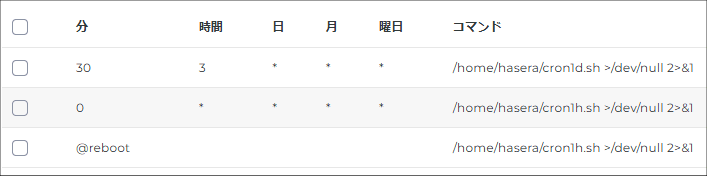
・1時間に1回(毎時0分)と、サーバー再起動時に、cron1h.shを動かします。
・1日1回(3時30分)に、cron1d.shを動かします。
追記(2026年9月19日)
redis-serverのプロセスが生きたまま、動作しなくなってサイトが表示されなくなる現象が発生したと思う(良く調べないでプロセスをkillしてしまった)ので、改善(したつもり)
#!/bin/sh
# redis-serverが正常に応答しなかったら起動
PING=$(/home/○○/.local/bin/redis-cli -s /home/○○/.local/bin/redis.sock ping 2>/dev/null)if [ “$PING” != “PONG” ]; then
# ログディレクトリ
LOGDIR=”/home/○○/log”
mkdir -p “$LOGDIR”# 今日のログファイル
LOGFILE=”$LOGDIR/cron-$(date ‘+%Y-%m-%d’).log”# ログ出力関数
log() {
echo “$(date ‘+%Y-%m-%d %H:%M:%S %Z’) | $*” >> “$LOGFILE”
}log “—————————–”
log “$(uptime)”
log “!!! redis-server is not responding. !!!”# redis-serverプロセスがあれば終了
PID=$(ps aux | grep ‘[r]edis-server’ | awk ‘{print $2}’)
if [ -n “$PID” ]; then
log “redis-server process found. PID: $PID”
kill $PID
sleep 1
fi/home/○○/.local/bin/redis-server /home/○○/.local/bin/redis.conf –daemonize yes
PING=$(/home/○○/.local/bin/redis-cli -s /home/○○/.local/bin/redis.sock ping 2>/dev/null)
if [ “$PING” = “PONG” ]; then
log “redis-server started successfully.”
else
log “!!! redis-server failed to start. !!!”
filog “—————————–”
fi
redis-serverが正常に応答しない場合は、redis-serverを再起動します。プロセスが残っていて正常に応答しない場合は、一旦プロセスをkillして再起動します。これをcronで毎分実行します。